
Ford key fob battery replacement: a five-minute fix
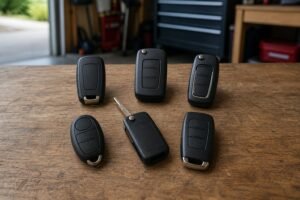
A Ford key fob battery replacement fixes most 'dead key' problems for the price of a coin cell. This guide shows which battery your Ford takes, how to open each type of key without cracking it, and what to check if the key still won't work afterwards.
It covers the Fords you see on UK roads every day: Fiesta, Focus, Puma, Kuga, EcoSport, Mondeo, S-MAX, Galaxy, Ka and the Transit family, with both flip keys and keyless (push-button start) fobs. No tools beyond a plastic pry tool or a coin are needed, and no reprogramming.
- Which battery each Ford model takes
- How to open a keyless fob and a flip key
- What to do if the key still doesn't work
- How to start the car with a dead fob
Key takeaways
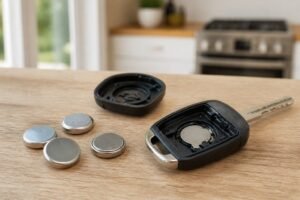
- It's almost always a CR2032 Nearly every Ford key fob sold in the UK runs on one 3V CR2032 lithium coin cell. Check the code on your old cell before buying.
- No reprogramming needed A Ford key keeps its pairing with the car when you change the battery.
- Twist, don't lever Open the case with a plastic tool and a gentle twist. Forcing a metal screwdriver into the seam is how most cases crack.
- Buy a branded cell Cheap no-name cells are a common reason a key still won’t work after a battery change.


Ford key fob batteries compared
|
Best overall
Energizer CR2032
|
Best uncoated
Panasonic CR2032
|
Best for families
Duracell CR2032
|
Budget pick
Amazon Basics CR2032
|
|
|---|---|---|---|---|
|
|
|
|
|
|
| Size | CR2032 | CR2032 | CR2032 | CR2032 |
| Bitter coating | No | No | Yes | No |
| Fits Fiesta, Focus, Kuga, Puma | Yes | Yes | Yes | Yes |
| Our score | 9.3 /10 | 9.1 /10 | 9.0 /10 | 8.2 /10 |
| Price | – | – | – | – |
| View | View | View | View |
Signs your Ford key fob battery is running low
A Ford key fob battery rarely dies without warning. Look out for these signs, and swap the cell when you first notice them rather than when the key gives up in a car park:
- Shorter range. You have to walk closer to the car before the doors respond.
- Several presses. Lock or unlock only works on the second or third try.
- A message on the dash. Many Fords show key battery low or, on keyless cars, key not detected.
- Keyless entry stops before the buttons do. Touch-to-unlock uses more power, so it often fails first.
Most owners get a few years from a good cell. Keyless keys tend to need one sooner than flip keys, because they talk to the car whenever you’re nearby.

Which battery does my Ford key fob take?
Ford key fob battery by model
| Fiesta (2008 onwards) | CR2032 |
| Focus (Mk2, Mk3, Mk4) | CR2032 |
| Puma, Kuga, EcoSport | CR2032 |
| Mondeo, S-MAX, Galaxy, C-MAX | CR2032 |
| Ka / Ka+, B-MAX | CR2032 |
| Transit, Transit Custom, Transit Connect | CR2032 |
| Some older remotes | Check the cell: a few used CR2025 |
Ford’s own handbooks, including the 2017-onwards Fiesta manual, specify a single three-volt CR2032 lithium coin cell for both the flip-key remote and the keyless (passive) key. Even so, read the code printed on your old battery before you order. The code is what matters, not the model name: a CR2025 is thinner than a CR2032 and won’t make reliable contact in a holder built for the thicker cell.
Buy a branded cell (Energizer, Duracell, Panasonic or Varta) from a trusted seller. Our test of the best car key fob batteries explains which CR2032 cells last longest and why some coated cells can cause poor contact.

The best batteries for your Ford key fob
The safe default for a Ford key fob battery
Energizer’s CR2032 is the cell we’d fit to a Ford key without a second thought. Key fobs draw short bursts of power every time you press a button or the car checks for a keyless key, and branded lithium cells handle that well. The cells are uncoated, so they make clean contact in Ford’s tight battery holders.
A four-pack covers your main key and spare, with two left for next time.
- Fits almost every Ford key fob
- Uncoated, so no contact problems
- Four-pack covers both keys and a spare set
- Buy from Amazon itself or a known retailer: fakes exist on third-party listings
- Packaging is fiddly to open
Datasheet-backed quality with no coating
Panasonic is one of the big coin-cell makers and publishes full specifications for its CR2032. Like Energizer, it has no bitter coating, which matters in keyless Ford fobs where the contacts sit close and a coated cell can occasionally make poor contact.
- No coating, clean contact
- Published capacity and temperature specs
- Child-resistant packaging
- Not always stocked in shops when you need one today
A trusted brand with child-safety features
Duracell’s key fob cells carry a bitter coating that discourages children from swallowing them, a real risk with coin cells. The trade-off is that the coating can occasionally stop a cell making good contact in tight holders. If a new Duracell doesn’t work in your Ford key, wipe the faces with an alcohol wipe or try an uncoated cell.
- Bitter coating adds child safety
- Packaged for key fob use
- Easy to find
- Coating can cause poor contact in some fobs
A cheap, uncoated cell from a seller you can trust
No-name bulk packs are a common reason a Ford key still won’t work after a battery change. Amazon Basics avoids that gamble: it’s cheap, non-coated and sold by Amazon itself, so the counterfeit risk is low.
- Low price
- Non-coated for clean contact
- Low counterfeit risk
- Less track record than the big brands
How to replace a Ford keyless fob battery
-
Release the emergency key blade
Press the small release button on the back of the fob and slide out the metal blade.
-
Find the opening slot
With the blade out you’ll see a slot in the fob. Some Ford keyless keys also have release points on the edges of the cover that you press to free it.
-
Prise the case apart gently
Use a plastic pry tool or a coin wrapped in cloth and twist, don’t lever. Work round the seam rather than forcing one spot.
-
Note which way up the cell sits
The positive (+) side almost always faces up, towards you. Take a photo before removing the old cell if you’re unsure.
-
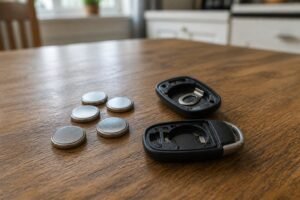
Fit the new CR2032
Slide it under the contacts by its edges. Avoid touching both flat faces, as skin oils can weaken the contact.
-
Clip it together and test
Press the halves until they click all the way round, refit the blade, then test lock, unlock and keyless start.
How to replace a Ford flip key battery
-
Fold the blade out
Press the release button so the blade swings out and is out of the way.
-
Separate the remote section
Find the small notch along the seam. Insert a plastic tool or coin and twist gently until the battery cover or the two halves come apart.
-
Swap the cell
Remove the old CR2032 and fit the new one with the + side facing the same way as before.
-
Reassemble and test
Snap it back together until the seam is flush all round, then check lock and unlock from a normal distance.
Older Fords with a fixed (non-flip) remote open the same way: find the notch in the seam and twist.

Ford key fob still not working after a new battery?
If the key does nothing after a fresh cell, work through these before assuming the key is faulty:
- Check the battery is the right way up. It’s the most common slip.
- Check the contact tab. The metal tab that presses on the cell can get bent flat. Ease it up very slightly with a fingernail.
- Try another cell. Old stock or fakes can be flat out of the packet, and some bitter-coated cells don’t make good contact in tight holders.
- Try the spare key. If the spare works, the first key may have a damaged board or been through the wash.
- Look for a cracked case. If the case won’t clip shut, the board can move and lose contact. A new shell fixes it without reprogramming.
Our guide on why a key fob doesn’t work after changing the battery goes deeper, and if the case is damaged, see how to replace a key fob shell. If keyless entry is the problem rather than the buttons, read our guide to Ford keyless entry not working.
A keyless Ford still starts with a flat fob. Hold the key in the backup position shown in your handbook (usually a marked spot on the steering column or in the centre console), press the brake or clutch, then press Start. The hidden metal blade opens the driver’s door.
Ford’s UK support site explains the passive key backup position for starting a car when the key battery is flat.
Ford key fob battery FAQ
What battery does a Ford key fob take?
Almost all Ford key fobs sold in the UK, including the Fiesta, Focus, Puma, Kuga and Transit, use one 3V CR2032 lithium coin cell. A few older remotes used a CR2025, so check the code on your old battery.
Do I need to reprogram my Ford key after changing the battery?
No. A Ford key fob keeps its programming when the battery is changed.
How long does a Ford key fob battery last?
Usually a few years with a good branded cell. Keyless keys tend to need a new battery sooner than flip keys because they communicate with the car more often.
Can a Ford dealer change the battery for me?
Yes, and many will do it while you wait, but it’s an easy DIY job that costs only the price of the cell.
Why does my Ford say 'key not detected' after a battery change?
Check the cell is the right way up and making contact, and try a different branded cell. If the spare key also fails, the fault may be with the car rather than the key.
The bottom line
- Most Ford fobs take a CR2032
- Twist the case open, don't lever it
- No reprogramming needed
- Keep a spare cell at home
Changing a Ford key fob battery takes five minutes: release the blade, twist the case open, fit a branded CR2032 with the + side up and clip it shut. No reprogramming is needed. If it still won’t work, check the contacts, try another cell and test your spare key.