
GMC 'No Remote Detected': what it means and how to fix it
The GMC 'No Remote Detected' message means the vehicle can't hear your key fob from inside the cabin, so the push-button start won't work. Usually the cause is a weak fob battery or radio interference, and there's a backup way to start the engine while you sort it out.
This guide covers push-button-start GMC models including the Sierra, Yukon, Acadia, Terrain and Canyon.
- What the message means
- How to start with the transmitter pocket
- The usual causes, in order
- When it's the vehicle, not the fob
Key takeaways
- Use the transmitter pocket Placing the fob in the backup pocket lets the vehicle read it at close range, even with a dead battery.
- Battery first A weak fob battery is the most common cause. Some fobs show ‘Replace Battery in Remote Key’ at the same time.
- Watch for interference Phones, chargers and other electronics near the fob can block its signal.
- Both fobs failing points to the vehicle If neither fob works even in the pocket, it’s a job for a dealer.
What 'No Remote Detected' means on a GMC
Push-button-start GM vehicles look for the fob with low-power antennas inside the cabin. When you press Start and the vehicle can't find a fob, the driver information center (DIC) shows No Remote Detected. Press the button a few more times and you'll often see a longer message telling you to place the key in the transmitter pocket.
GM's own technician bulletins group 'No Remote Detected' with poor remote range and other symptoms across a wide span of models from 2007 to 2025, so it's a well-known condition rather than a rare fault. The good news is that the fix is usually simple.
How to start your GMC when the fob isn't detected
-
Find the transmitter pocket
Your owner’s manual shows the exact spot. See the table below for common locations.
-
Place the fob in the pocket
Follow the manual’s orientation; on many models the buttons face up.
-
Press the brake and Start
With the vehicle in Park or Neutral, press the brake and the ENGINE START/STOP button as normal.
-
Replace the battery soon
Starting from the pocket is a workaround. Fit a new cell before the fob fails completely.
Where to find the GMC transmitter pocket

GMC No Remote Detected: checks in order
-
Replace the fob battery
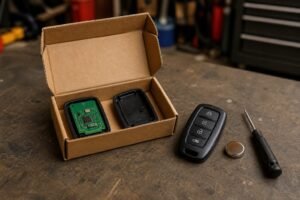
Most GM fobs take a CR2032; some of the newest take a CR2450. A weak cell is the number-one cause.
-
Move phones and chargers away
Keep the fob away from your phone, a wireless charging pad, power banks and other keys while starting.
-
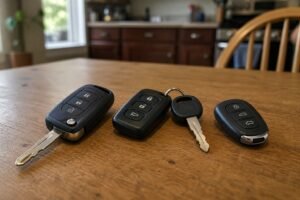
Try the spare fob
If the spare starts the vehicle normally, the first fob’s battery or electronics are at fault.
-
Check the vehicle battery
A weak 12V battery can upset the keyless system. It’s worth testing if the vehicle has sat unused.
-
Check for a newer fob in the vehicle
A fob left elsewhere in the cabin, or an unprogrammed fob, can confuse things. Keep other keys out of the way.
-
Book a diagnosis
If neither fob works, even in the pocket, the vehicle needs a dealer or auto electrician to check the antennas and modules.
Fix it with a fresh battery
Start with a branded cell. See our GMC key fob battery replacement guide for step-by-step photos, and our test of the best car key fob batteries.

The safe default for most key fobs
Energizer’s CR2032 is the cell to reach for when your fob takes a 2032. Fobs draw short bursts of power with every button press and every keyless check, and branded lithium cells handle that well. The cells are uncoated, so they make clean contact in tight holders. A four-pack covers your main fob, your spare and the next swap.
- Fits the most common fob size
- Uncoated for clean contact
- Four-pack covers both fobs
- Buy from Amazon itself or a known retailer: fakes exist
- Packaging is fiddly

For newer smart keys that take the thicker cell
Several newer push-button-start fobs use a CR2450 instead of a CR2032. It’s wider and thicker, with more capacity, and the two are not interchangeable. If the old cell in your fob says 2450, this Energizer two-pack covers your main fob and spare.
- Correct size for newer smart keys
- Higher capacity than a CR2032
- Trusted brand
- Only fits fobs designed for CR2450

When it's the vehicle, not the fob
If both fobs fail to start the vehicle, even from the transmitter pocket, the problem is almost certainly on the vehicle side: a failed antenna, a module fault or a wiring problem. GM's bulletins for related symptoms also mention the security light, intermittent no-start and a 'Service Tire Pressure Monitor' message, because several of these systems share the same radio receiver. A dealer or auto electrician can read the codes.
For more background, read why your car isn't detecting the key fob and why a key fob won't start the car. If you need a new fob, our guide to programming a GMC key fob explains your options, and GMC replacement key cost covers what you'll pay.
Starting from the transmitter pocket every day hides a problem rather than fixing it. Replace the battery, and if the fob still isn’t detected, have it checked before your spare fails too.
GMC No Remote Detected FAQ
What does 'No Remote Detected' mean?
The vehicle can’t detect a programmed fob inside the cabin, so it won’t start with the push button.
Can I still drive?
Usually yes: put the fob in the transmitter pocket, press the brake and press Start.
Why does it happen with a new battery?
Check the battery size and orientation, try a different branded cell, and keep the fob away from phones and chargers. If it continues, have the fob and vehicle checked.
Where is the transmitter pocket?
It varies by model: in or under a cupholder, in the center console or in the glovebox on some older models. Your owner’s manual shows the exact spot.
Is it covered by warranty?
If the vehicle is under warranty and the fault is on the vehicle side, ask your dealer. Fob batteries are a wear item.
The bottom line
- Start from the transmitter pocket
- Replace the fob battery
- Keep electronics away from the fob
- Both fobs failing means a vehicle fault
The GMC ‘No Remote Detected’ message is usually a weak fob battery or interference. Start from the transmitter pocket, fit a fresh cell, keep phones and chargers away, and try the spare. If neither fob works even in the pocket, book the vehicle in.